Filitre Uygulamaları 
Örnek
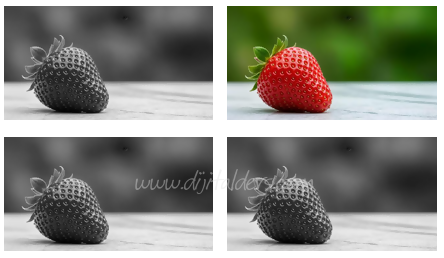
<script>
for(i=0;i <50; i++) {
let img = document.createElement("img");
img.src ="https://static.vecteezy.com/system/resources/thumbnails/057/068/323/small/single-fresh-red-strawberry-on-table-green-background-food-fruit-sweet-macro-juicy-plant-image-photo.jpg";
img.style="width:300px; height:auto; margin:10px";
document.body.appendChild(img);
}
document.querySelectorAll("img").forEach(Resim => {
Resim.addEventListener("mouseenter", function(){
this.style.filter = (this.style.filter == "grayscale(100%)") ? "grayscale(0%)" : "grayscale(100%)";
});
}
);
</script>
for(i=0;i <50; i++) {
let img = document.createElement("img");
img.src ="https://static.vecteezy.com/system/resources/thumbnails/057/068/323/small/single-fresh-red-strawberry-on-table-green-background-food-fruit-sweet-macro-juicy-plant-image-photo.jpg";
img.style="width:300px; height:auto; margin:10px";
document.body.appendChild(img);
}
document.querySelectorAll("img").forEach(Resim => {
Resim.addEventListener("mouseenter", function(){
this.style.filter = (this.style.filter == "grayscale(100%)") ? "grayscale(0%)" : "grayscale(100%)";
});
}
);
</script>
Örnek

<html>
<head>
<title>java</title>
<style type="text/css">
img { border:10px solid #CCFF33; filter:alpha(opacity=20); opacity: .2; }
</style>
</head>
<body>
<script type="text/javascript">
<
function Gozuk(Resim){
Gozukme();
Resim.style.cssText="filter:alpha(opacity=100); opacity: 1;";
}
function Gozukme(){
Resimler=document.getElementsByTagName("img");
for(i=0; i<Resimler.length; i++){
Resimler[i].style.cssText="filter:alpha(opacity=20); opacity: .2;";
}
}
//>
</script>
<img src="resimler/3.gif" width="260px" height="260px" onmouseover="Gozuk(this)" onmouseout="Gozukme()" />
<img src="resimler/3.jpg" width="260px" height="260px" onmouseover="Gozuk(this)" onmouseout="Gozukme()" />
<img src="resimler/4.jpg" width="260px" height="260px" onmouseover="Gozuk(this)" onmouseout="Gozukme()" />
</body>
</html>
<head>
<title>java</title>
<style type="text/css">
img { border:10px solid #CCFF33; filter:alpha(opacity=20); opacity: .2; }
</style>
</head>
<body>
<script type="text/javascript">
<
function Gozuk(Resim){
Gozukme();
Resim.style.cssText="filter:alpha(opacity=100); opacity: 1;";
}
function Gozukme(){
Resimler=document.getElementsByTagName("img");
for(i=0; i<Resimler.length; i++){
Resimler[i].style.cssText="filter:alpha(opacity=20); opacity: .2;";
}
}
//>
</script>
<img src="resimler/3.gif" width="260px" height="260px" onmouseover="Gozuk(this)" onmouseout="Gozukme()" />
<img src="resimler/3.jpg" width="260px" height="260px" onmouseover="Gozuk(this)" onmouseout="Gozukme()" />
<img src="resimler/4.jpg" width="260px" height="260px" onmouseover="Gozuk(this)" onmouseout="Gozukme()" />
</body>
</html>
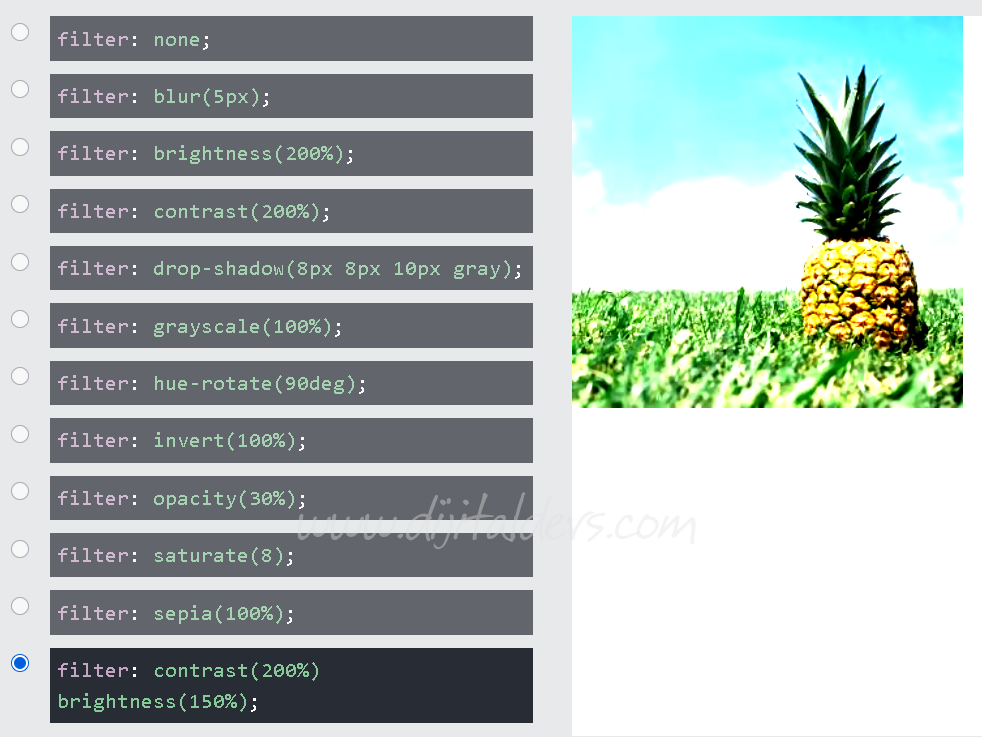
filter Parametreleri
Kaynak