Yan Menü / Side Bar
Örnek
<style>
</style>
</head>
<body>
<button id="menuToggle">?</button>
<div class="sidebar" id="sidebar">
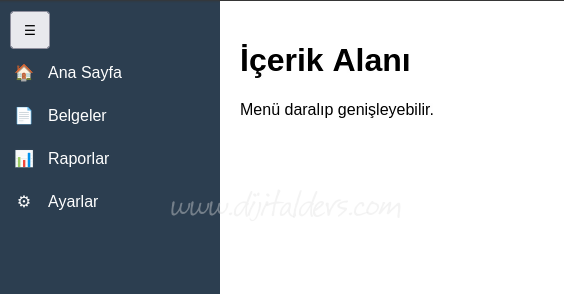
<a href="#"><span class="icon">????</span><span class="text">Ana Sayfa</span></a>
<a href="#"><span class="icon">????</span><span class="text">Belgeler</span></a>
<a href="#"><span class="icon">????</span><span class="text">Raporlar</span></a>
<a href="#"><span class="icon">?</span><span class="text">Ayarlar</span></a>
</div>
<div class="content">
<h1>İçerik Alanı</h1>
<p>Menü daralıp genişleyebilir.</p>
</div>
<script>
document.getElementById("menuToggle").addEventListener("click", function () {
document.getElementById("sidebar").classList.toggle("collapsed");
});
</script>
body {
margin: 0;
font-family: Arial, sans-serif;
}
/* Toggle buton */
#menuToggle {
position: fixed;
top: 10px;
left: 10px;
z-index: 1000;
padding: 8px 12px;
cursor: pointer;
}
/* Sidebar */
.sidebar {
position: fixed;
top: 0;
left: 0;
height: 100vh;
width: 220px;
background: #2c3e50;
transition: width 0.3s ease;
overflow: hidden;
padding-top: 50px;
}
/* Menü linkleri */
.sidebar a {
display: flex;
align-items: center;
gap: 12px;
padding: 12px;
color: #fff;
text-decoration: none;
white-space: nowrap;
}
.sidebar a:hover {
background: #34495e;
}
/* İkon */
.sidebar .icon {
min-width: 24px;
text-align: center;
}
/* KAPALI HAL */
.sidebar.collapsed {
width: 60px;
}
.sidebar.collapsed .text {
display: none;
}
/* İçerik */
.content {
margin-left: 220px;
padding: 20px;
transition: margin-left 0.3s ease;
}
.sidebar.collapsed ~ .content {
margin-left: 60px;
}
margin: 0;
font-family: Arial, sans-serif;
}
/* Toggle buton */
#menuToggle {
position: fixed;
top: 10px;
left: 10px;
z-index: 1000;
padding: 8px 12px;
cursor: pointer;
}
/* Sidebar */
.sidebar {
position: fixed;
top: 0;
left: 0;
height: 100vh;
width: 220px;
background: #2c3e50;
transition: width 0.3s ease;
overflow: hidden;
padding-top: 50px;
}
/* Menü linkleri */
.sidebar a {
display: flex;
align-items: center;
gap: 12px;
padding: 12px;
color: #fff;
text-decoration: none;
white-space: nowrap;
}
.sidebar a:hover {
background: #34495e;
}
/* İkon */
.sidebar .icon {
min-width: 24px;
text-align: center;
}
/* KAPALI HAL */
.sidebar.collapsed {
width: 60px;
}
.sidebar.collapsed .text {
display: none;
}
/* İçerik */
.content {
margin-left: 220px;
padding: 20px;
transition: margin-left 0.3s ease;
}
.sidebar.collapsed ~ .content {
margin-left: 60px;
}
</style>
</head>
<body>
<button id="menuToggle">?</button>
<div class="sidebar" id="sidebar">
<a href="#"><span class="icon">????</span><span class="text">Ana Sayfa</span></a>
<a href="#"><span class="icon">????</span><span class="text">Belgeler</span></a>
<a href="#"><span class="icon">????</span><span class="text">Raporlar</span></a>
<a href="#"><span class="icon">?</span><span class="text">Ayarlar</span></a>
</div>
<div class="content">
<h1>İçerik Alanı</h1>
<p>Menü daralıp genişleyebilir.</p>
</div>
<script>
document.getElementById("menuToggle").addEventListener("click", function () {
document.getElementById("sidebar").classList.toggle("collapsed");
});
</script>