Javascriptle CSS Değişkenlerini Değiştirme
Örnek
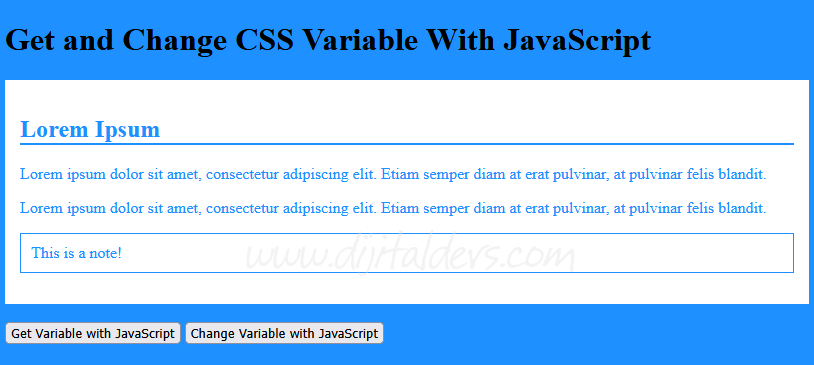
<!DOCTYPE html>
<html>
<head>
<style>
:root {
  primary-bg-color: #1e90ff;
  primary-color: #ffffff;
}

body {
  background-color: varprimary-bg-color);
}

.container {
  color: varprimary-bg-color);
  background-color: varprimary-color);
  padding: 15px;
}

.container h2 {
  border-bottom: 2px solid varprimary-bg-color);
}

.container .note {
  border: 1px solid varprimary-bg-color);
  padding: 10px;
}
</style>

<script>
// Get the root element
var r = document.querySelector(':root');

// Create a function for getting a variable value
function myFunction_get() {
  // Get the styles (properties and values) for the root
  var rs = getComputedStyle(r);
  // Alert the value of the primary-bg-color variable
  alert("The value of primary-bg-color is: " + rs.getPropertyValue('primary-bg-color'));
}

// Create a function for setting a variable value
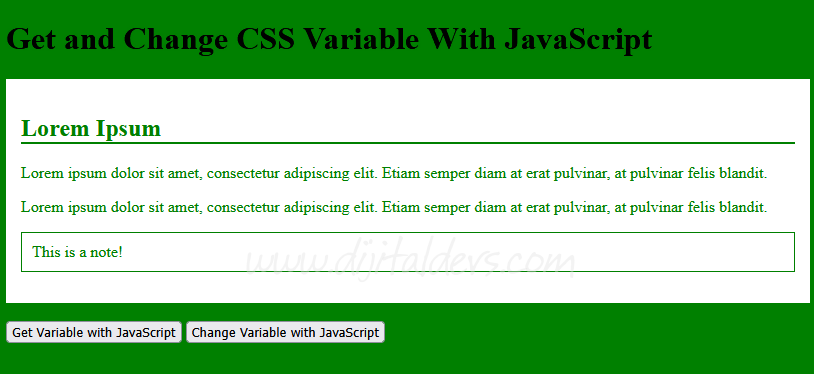
function myFunction_set() {
  // Set the value of variable primary-bg-color to another value (in this case "green")
  r.style.setProperty('primary-bg-color', 'green');
}
</script>
</head>
<body>

<h1>Get and Change CSS Variable With JavaScript</h1>

<div class="container">
  <h2>Lorem Ipsum</h2>
  <p>Lorem ipsum dolor sit amet, consectetur adipiscing elit. Etiam semper diam at erat pulvinar, at pulvinar felis blandit.</p>
  <p>Lorem ipsum dolor sit amet, consectetur adipiscing elit. Etiam semper diam at erat pulvinar, at pulvinar felis blandit.</p>
  <p class="note">This is a note!</p>
</div>
<br>

<button type="button" onclick="myFunction_get()">Get Variable with JavaScript</button>
<button type="button" onclick="myFunction_set()">Change Variable with JavaScript</button>

</body>
</html>